Showing posts with label GST. Show all posts

Sunday, 19 March 2017

Difference between GST Adjustment & Local GST Adjustment

In Auto Count Invoicing or AR/AP part,  we can always see this two column. Actually what is the use of this two column?

Both column is for GST Malaysia use only.

GST Column is used when your debtor or creditor currency is using local currency such as MYR. This column is normally for local debtor or creditor


Local GST Adjustment is used when your debtor or creditor currency is using foreign currency such  as USD, SGD or other currency. Normally if your debtor or creditor is oversea company and transaction is based on foreign currency, you may use Local GST Adjustment to adjust the GST value.


Is there any effect is I keyed the amount to wrong column?

Yes. It may result in bank reconciliation amount not tally or foreign gain loss amount not correct.

Tuesday, 3 January 2017

Claim Bad Debt Relief


在GST时代,做Account又要兼顾GST,真是不容易.

有一条规矩是假设你的顾客不是GST Registered Person, 就算超过六个月,你也不可以Claim 回GST. 所以要比较注意这点,不然你做错了,Custom可能就有机会找你麻烦。

Bad Debt Relief
 
在AutoCount里面你需要做几个Setting.
ARà Debtor Maintenanceà Othersà Is Tax Registered
如果你的Debtor有Register GST 的话,你就要打勾。
 
当你Process GST的时候, 系统就会根据你的顾客到底是不是GST Registered Person, 如果你maintain 你的顾客不是GST Registered Person,那么这些顾客的Invoices都不会出现在Manage AR Bad Debt Relief. 这可以确保你不会Claim 错GST。大家要多注意这点咯。


Bad Debt Relief Decision Amended

Sunday, 1 January 2017

AR Deposit 6%


在GST时代,你从顾客身上收到的Deposit或者Advanced Payment都会被charge 6%先,除非你在呈交GST时,所收到的Payment要knock off .

在AR Deposit,有个function “Is Security Deposit" Tick 了这个, 你的Deposit 将不会被征收6% GST.  当然你要确保那一类Deposit要被征收GST6%,那一类Deposit不用GST6%,以免做错。


Deposit 在AutoCount Basic 或以上的版本才会有。


Monday, 26 December 2016

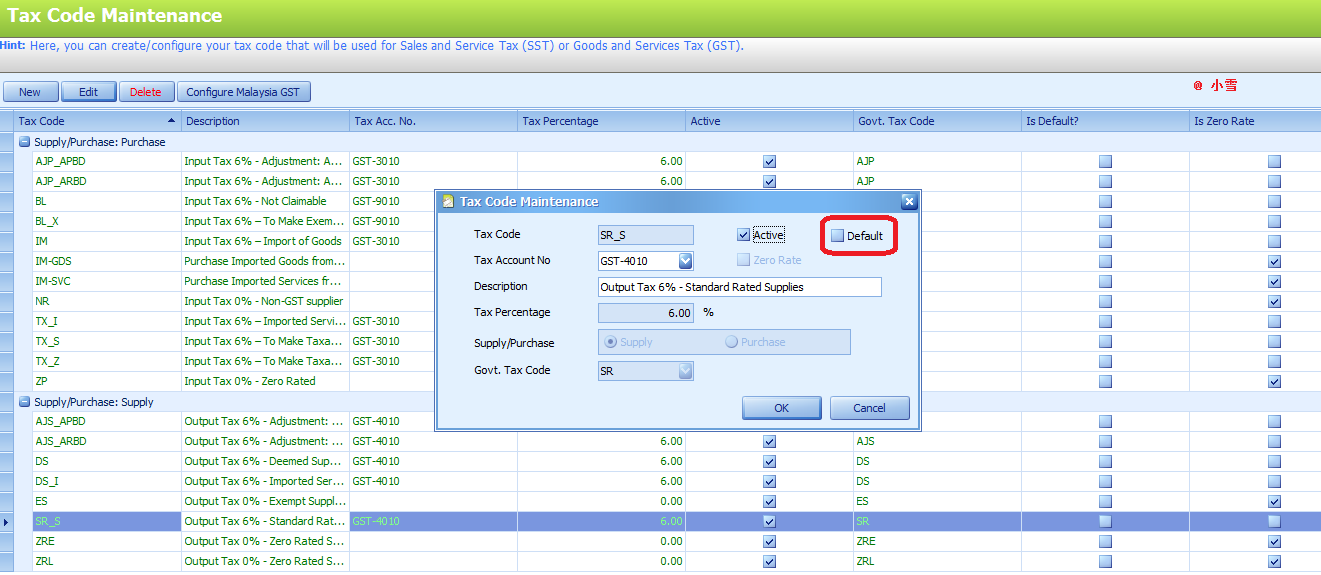
Set Default GST at Tax Code Maintenance

在AutoCount,你可以set Default GST Tax Code. 就比如来讲你公司卖货给顾客是固定的SR 6%,你可以把它set 成Default, 当你每次开单时,SR6% 就会自动出来,你不用每次去选要用什么Tax Code。


GST--> Tax Code Maintenance--> 选择Tax Code, 然后在Default那里Tick按OK就可以了。

之后当你开单的时候SR 6% 就会自动被选用。


还有几个地方可以Set Default,下次在谈!

Thursday, 15 December 2016

Difference between Bad debt relief & Bad Debt with Bad Debt Relief

很多人都会搞乱到底什么是Bad debt relief ,什么是 Bad Debt with Bad Debt Relief。
很多用户都在AutoCount 做错。

Bad debt relief 是你代顾客换6% GST, 到了六个月你的顾客还没还钱,你就可以Claim回 6% GST。

Bad Debt with Bad Debt Relief 是你的顾客破产了或者倒闭了没有钱还你而你要Claim 会6% GST,你才需要做。一旦做了,改次你就不需要做Bad Debt Recovery.因为顾客已经没能力还你钱了。系统会帮你自动开AR CN,knock off Invoice 再post to journal, 那么顾客欠你的烂帐就会抵消掉。


要小心选择当你在 Manage AR Bad Debt Relief,一旦做错了,要改就很难了。假设你要做Bad debt relief ,却不小心按了Bad Debt with Bad Debt Relief , 下次顾客还钱的时候,你就Knock knock不到发票, 你也做不到Bad Debt Recovery.

Wednesday, 14 December 2016

How to Handle Past Bad Debt Relief in AutoCount


一般上来讲,如果你中途换会计系统,而你又在旧的系统做了Bad Debt Relief, 你没有可能在新的系统在做多一次Bad Debt Relief。要怎样让新的系统知道你已经做了Bad Debt Relief,那么在下次你顾客还钱之后,你又可以交付6%给Custom?


比如说以下图片, 这个发票是从旧的系统带过来的。


你要去GST--> Manage AR Bad Debt Relief

选择Date或者Debtor, 然后单就好出现了,你要选择那些已经claim过GST的Past Invoice。

然后在Create Past Bad Debt Relief. 那么系统就会知道这些单已经是Bad Debt Relief,改次顾客还钱的时候, 你又怎样可以在系统做 Bad Debt Recovery?.

Monday, 12 December 2016

Change Taxable Period In AutoCount

如果你的公司已经换了Gst Taxable period,意思是说可能之前是三个月交GST 一次,现在换成了一个月, 那么你也要在AutoCount换成一个月。不然你跑GST Processor也是三个月的的Transactions.


首先,你要去Tools-->Options-->General-->Good and Service Tax

在GST Taxable Period(Months)哪里换成一个月,然后再按OK就行了。


Monday, 28 November 2016

AutoCount -Maintain MSIC Code

在GST时代, MSIC Code 是非常重要的。在AutoCount,如果你没有为Sales Account填上MSIC Code 的话,在GST Processor的GST-03 column 19, 你的sales amount 会出现在lain-lain 那边。

如果你的sales amount在lain-lain 那里, 上TAP交GST时,system 是不会给你过的。


所以要在Sales Account 哪里填上你的MSIC Code 哦。

首先你要去G/L--> Account Maintenance-->选择Sales Account或者与Sales 有关的Account--> Edit Account 然后填下你公司的MSIC Code.


如果你们不知道公司的MSIC Code是什么, 可以浏览这个网站查询。

http://msic.stats.gov.my/bi/